Product Type: Mobile App & Cloud-Based page Target Audience: Finance Managers Core Functionality: Automating invoice processing while ensuring human approval for accuracy and compliance.
In the financial sector, manual invoice processing is time-consuming and prone to human errors, especially when dealing with complex structures, discounts, rental, subscriptions and regulatory compliance. Throughout my experience in UX design for financial systems, I have worked on optimizing invoice processing workflows, automation-driven calculations, and human oversight in financial management to enhance accuracy and usability.
This case study is a demonstrative project showcasing the UX methodologies and problem-solving approaches I have applied in real-world financial automation systems. The objective was to design an automated invoice processing system that streamlines invoice generation while maintaining human oversight for validation and compliance.
Role and responsibilities
As a UX/UI Designer, I led the research, design, and optimization of the automated invoice processing system, ensuring that it streamlined workflows, reduced errors, and provided a clear approval process for finance managers. My key responsibilities included:
User Research & Testing – Conducted interviews, Led contextual inquries, Performed competitor analysis, and conducted usability tests to identify pain points and user needs.
Wireframing & Prototyping – Designed low- and high-fidelity prototypes to refine interactions and enhance workflows.
Cross-functional Collaboration – Worked closely with finance team, product managers, engineers, and stakeholders to align design goals with business objectives.
Design System Implementation – Developed scalable UI components and interaction patterns for consistency across platforms.
Iterative Design & Optimization – Continuously refined the design based on usability feedback and performance metrics to enhance engagement.
Problem statement
Design an Automation-powered invoice system that improves efficiency, accuracy, and trust while maintaining human oversight.
90% of finance managers don’t fully trust AI in financial calculations.
80% manually adjust invoices due to rounding errors & incorrect AI-generated values.
60% find invoice approval workflows too complex.
Contextual Inquiry
Method: Observed finance teams using existing invoicing systems. Findings:
Duplicate entries and data formatting inconsistencies cause payment delays.
Users copy-paste data from Excel into invoicing software.
Tax and discount calculations are manually verified, slowing down processing.
Heuristic Evaluation
Evaluated existing finance dashboards using Nielsen’s heuristics. Findings:
Poor visibility of system status → Users don’t know what’s being calculated.
High cognitive load → Too much data displayed at once.
No clear trust indicators for automation decisions.
UX strategy & definition
The strategy focused on reducing manual workload through automation while ensuring finance managers retained control over invoice approvals. I defined clear user needs, mapped workflows, and prioritized usability improvements to create an efficient and error-free experience. The key themes were:
Users want an “Explain Automation Calculation” button.
Users need a single-click “Approve All” option for bulk invoices.
Users want adjustments to be editable before approval.
Persona
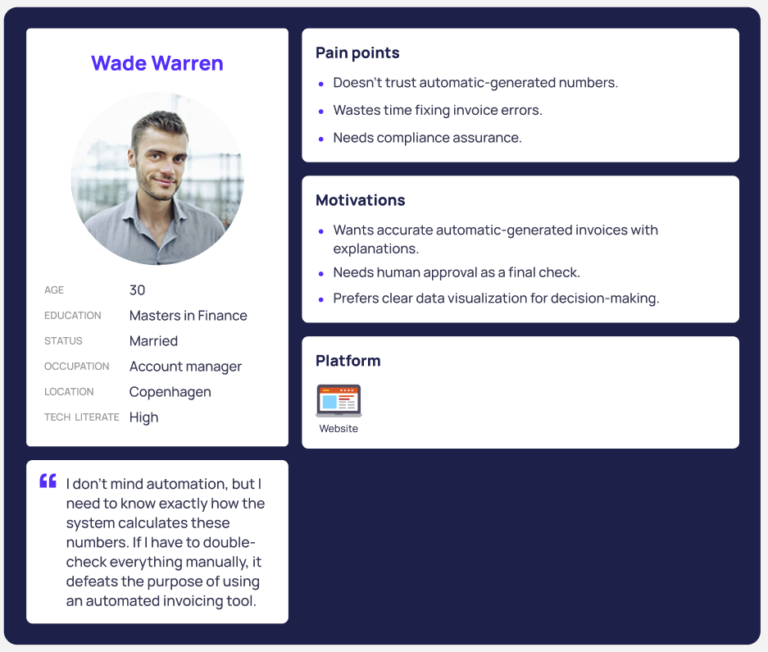
I developed a finance manager persona based on research, focusing on their need for accuracy, compliance, and trust in automation. This helped shape the design by ensuring that the system addressed their pain points, such as manual adjustments and verification delays. Pain points: Doesn’t trust automatic-generated numbers. Wastes time fixing invoice errors. Needs compliance assurance.
Motivations:
Wants accurate automatic-generated invoices with explanations. Needs human approval as a final check. Prefers clear data visualization for decision-making.
User journey mapping
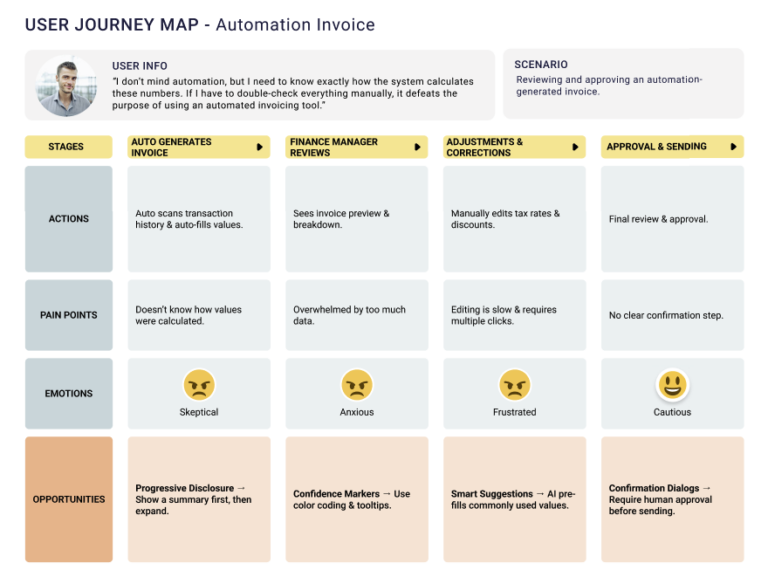
A detailed journey map highlighted friction points in the invoice approval process, including information overload, unclear AI calculations, and redundant manual steps. The new workflow streamlined invoice review, enabling quick edits, confidence markers, and final approval before sending.